DecisionFlow decision making app icon
Decision Making App for iPhone & iPad

Make Better Decisions, Faster — With Proven Frameworks

DecisionFlow helps you cut through indecision using the Eisenhower Matrix, Cost-Benefit Analysis, and Custom Analysis — then tracks every decision on one dashboard so you always know where you stand. 100% private. No account needed.

 Download on the App Store — Free
✓ 3 decision frameworks✓ No account needed✓ 100% private & on-device✓ Free to start

See DecisionFlow in Action

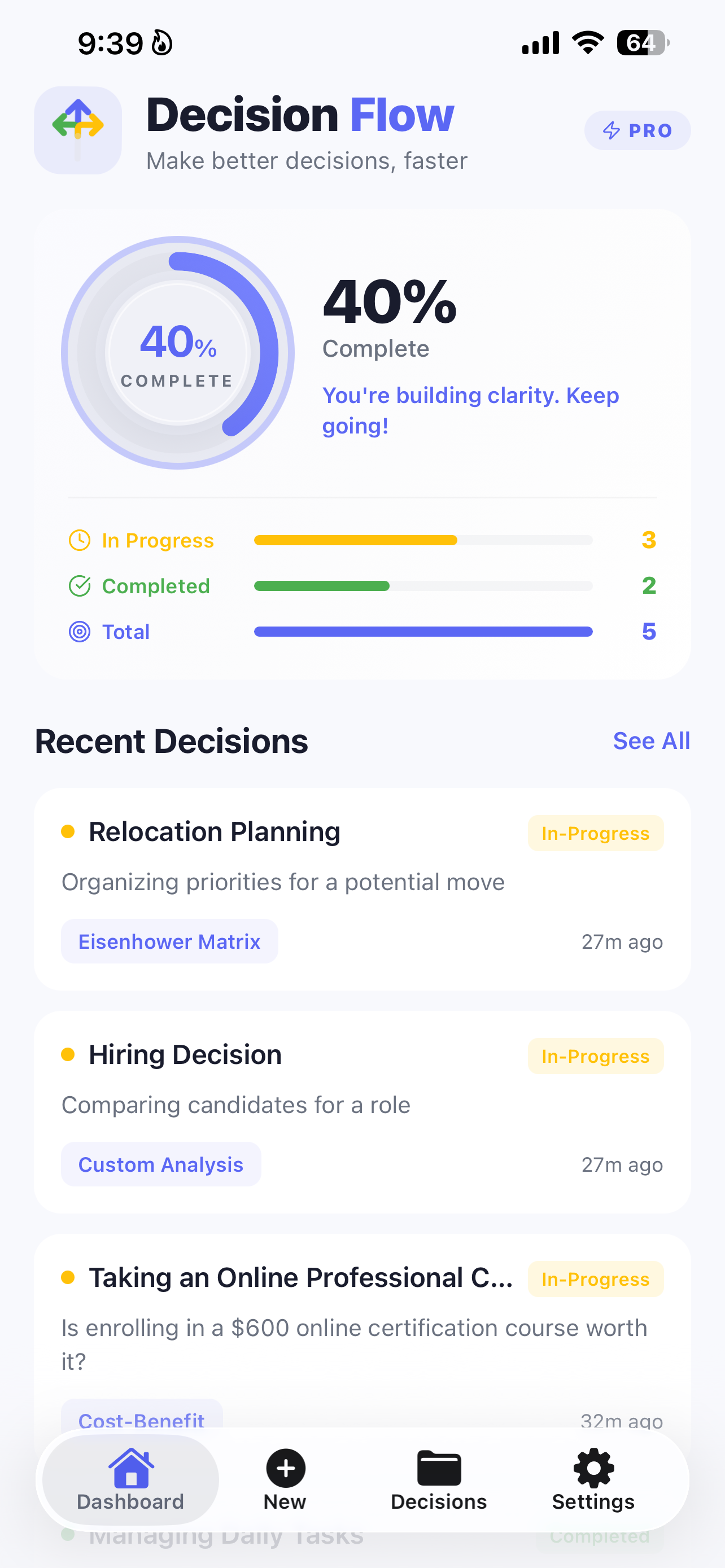
One dashboard for every hard call — see exactly where each decision stands and which framework you used to get there.

DecisionFlow dashboard showing completion ring, In Progress and Completed decisions, and Recent Decisions using the Eisenhower Matrix, Custom Analysis, and Cost-Benefit frameworks

Your dashboard: completion ring, decision stats, and recent decisions at a glance

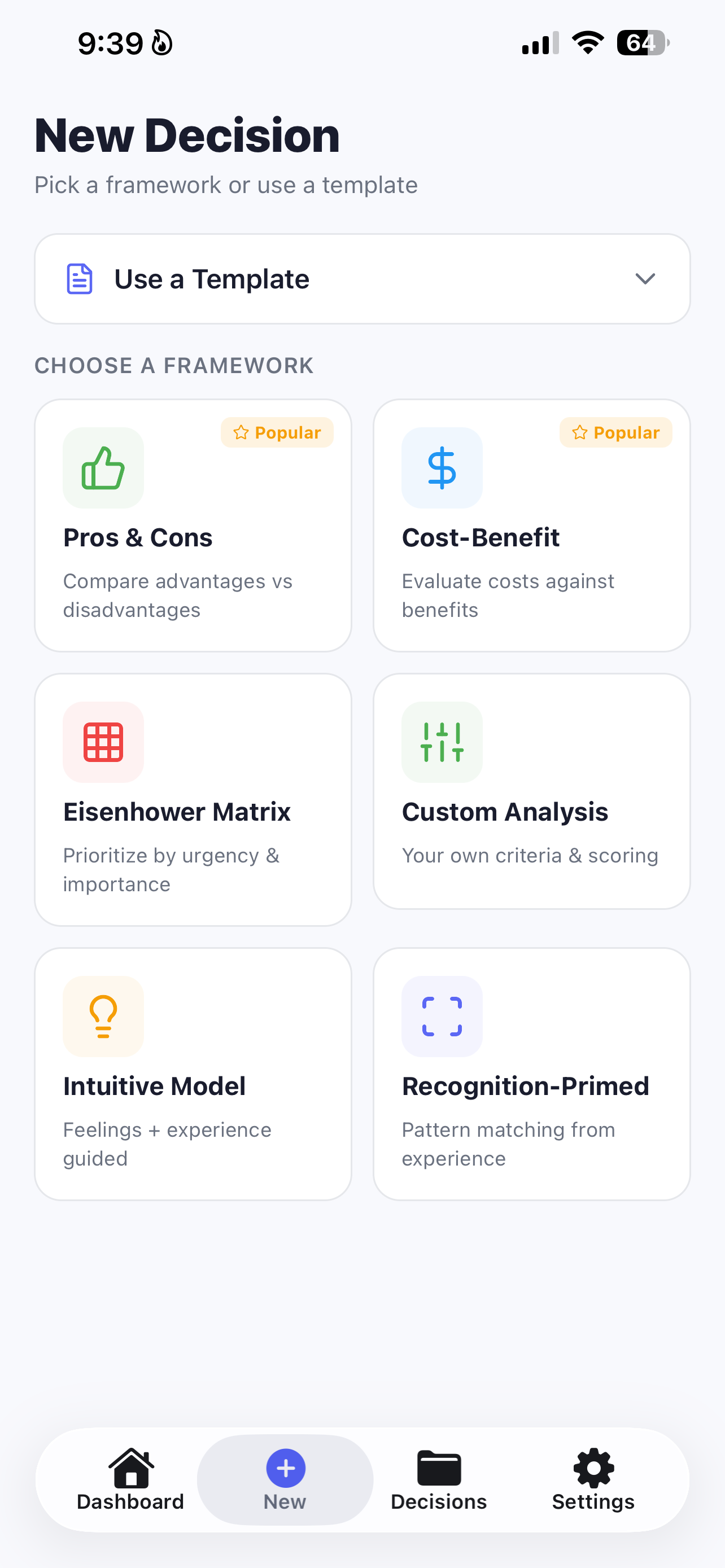
Choosing a decision framework in DecisionFlow — Pros and Cons, Cost-Benefit, Eisenhower Matrix, Custom Analysis, Intuitive Model, or Recognition-Primed

Pick a framework or start from a ready-made template

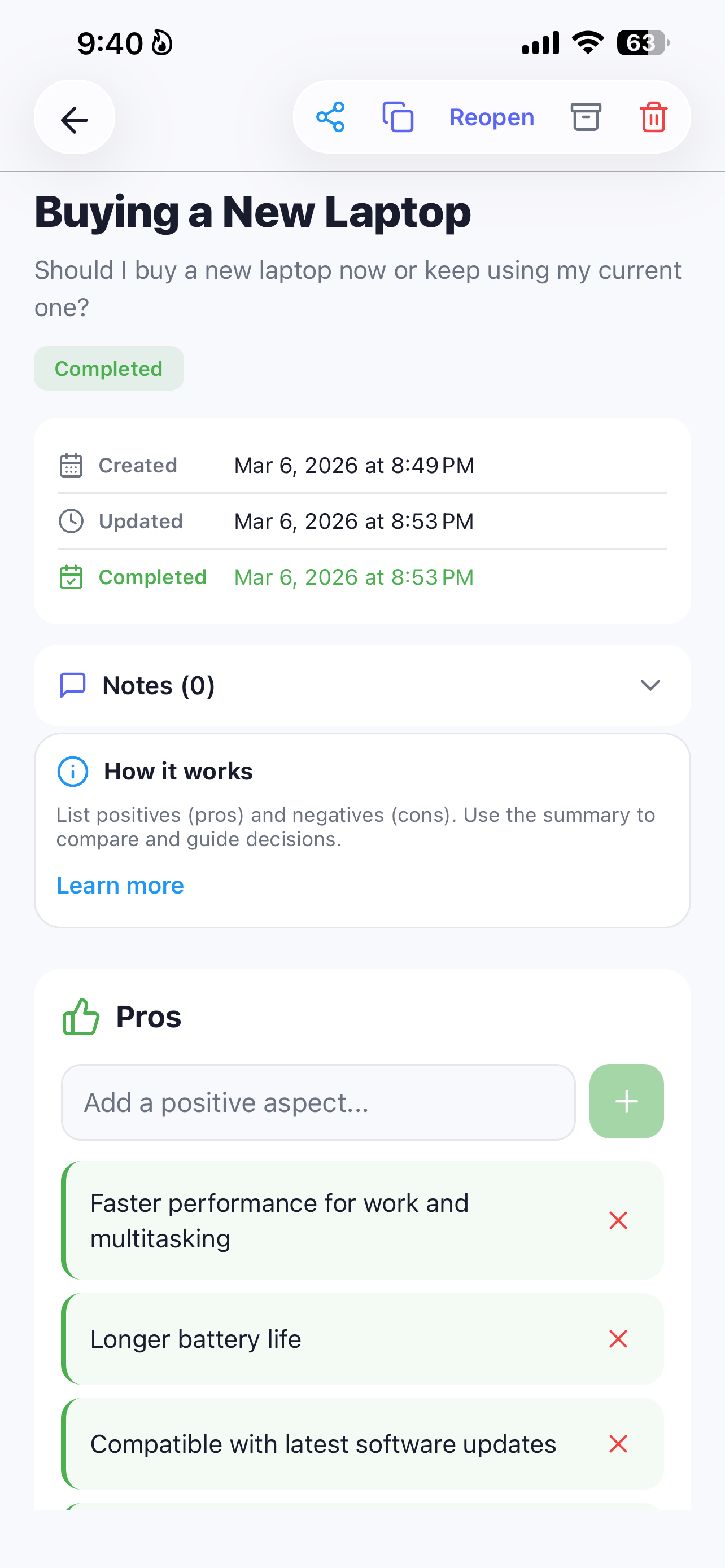
A completed Pros and Cons decision in DecisionFlow about buying a new laptop

Pros & Cons: weigh a real decision, side by side

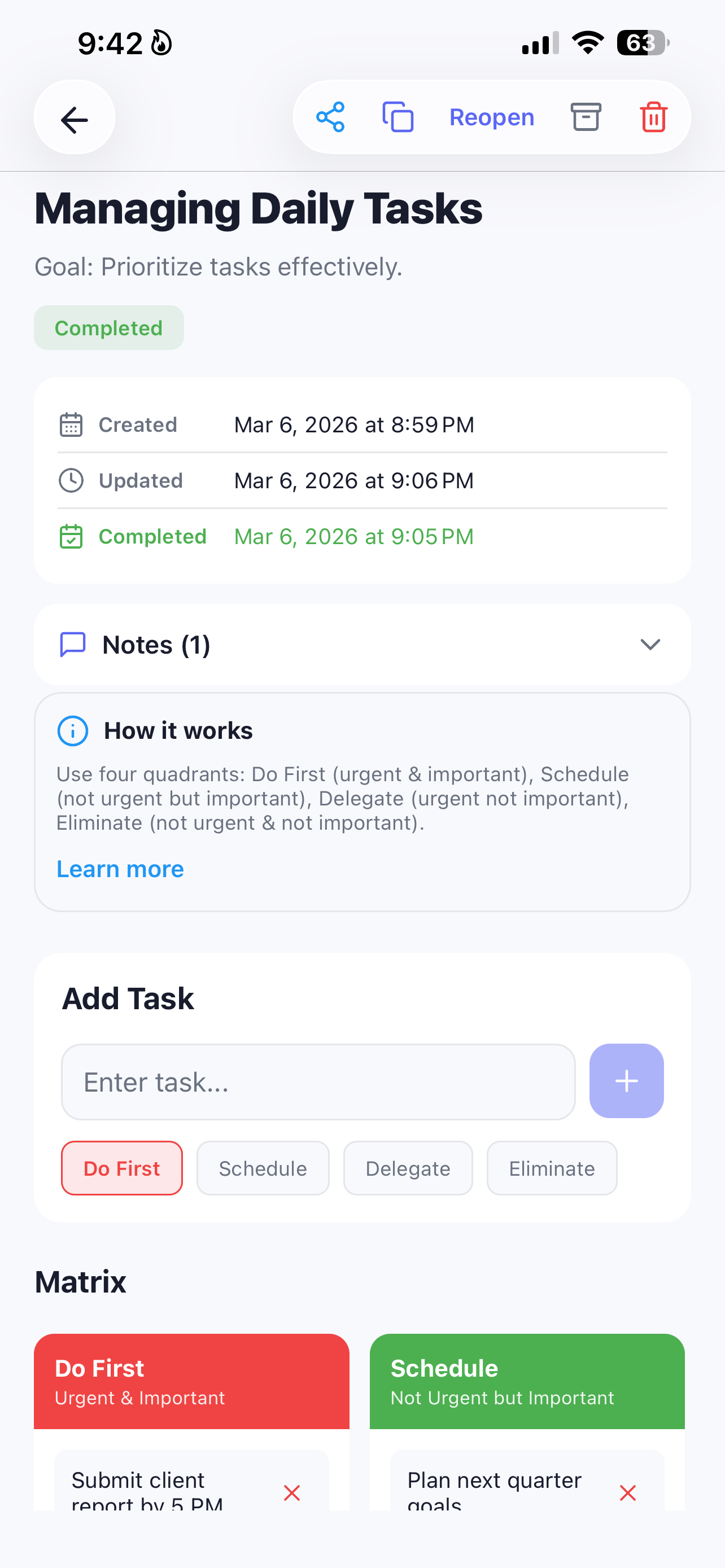
Building an Eisenhower Matrix decision in DecisionFlow for managing daily tasks

Eisenhower Matrix: add items and sort by urgency & importance

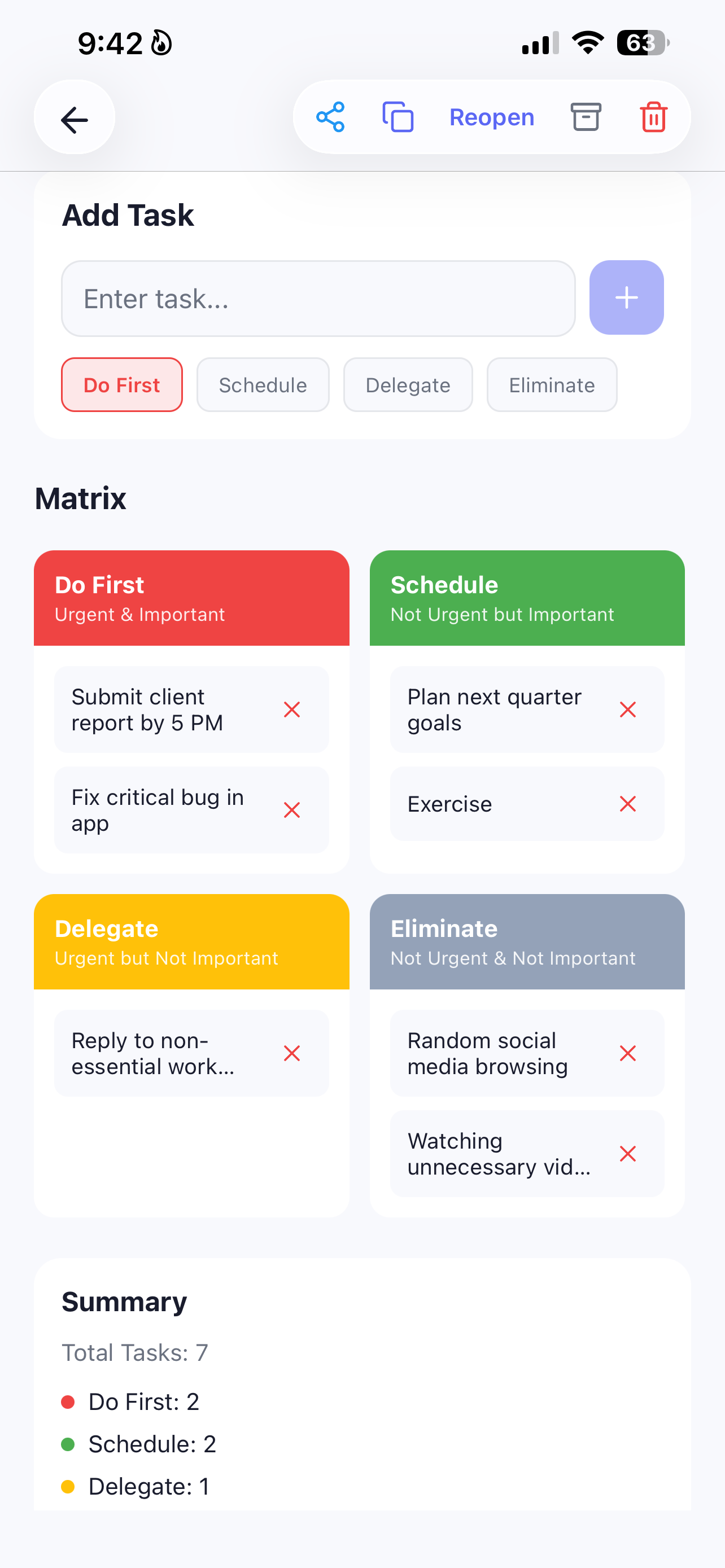
A filled-out Eisenhower Matrix in DecisionFlow with Do First, Schedule, Delegate, and Eliminate quadrants

See the whole picture: Do First, Schedule, Delegate, Eliminate

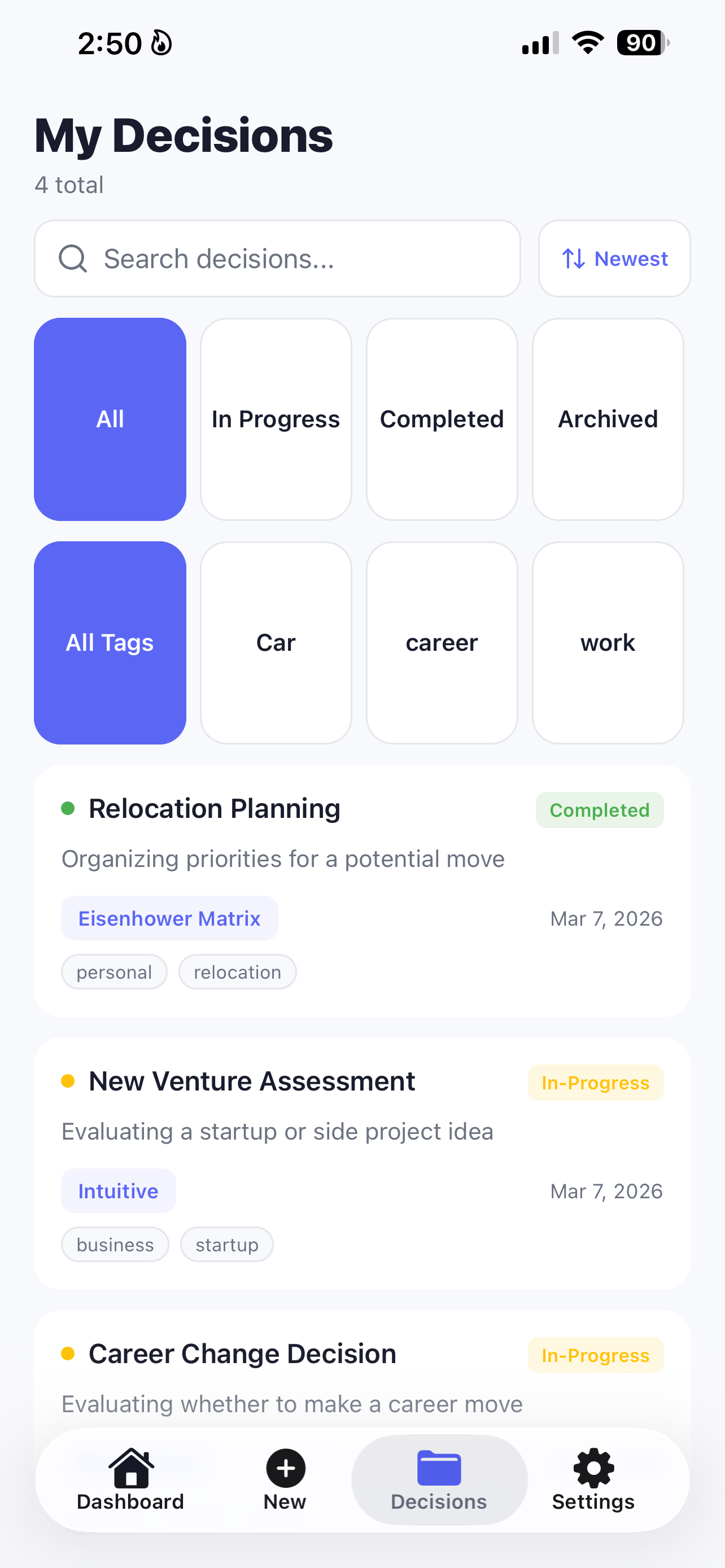
My Decisions list in DecisionFlow showing all past and in-progress decisions with tags and frameworks used

Every decision, saved and searchable — filter by status or tag

Three Frameworks. One App.

Pick the right tool for the decision in front of you — DecisionFlow adapts to both quick calls and complex, high-stakes choices.

Eisenhower Matrix

Sort your options or tasks by urgency and importance into four clear quadrants — instantly obvious what to act on now, schedule, delegate, or drop. Great for relocation planning, daily priorities, and competing commitments.

Cost-Benefit Analysis

Weigh what a choice will really cost you — money, time, effort, risk — against what it delivers. Built for job offers, big purchases, and evaluating whether that course or investment is worth it.

Custom Analysis

Build your own criteria when a decision doesn't fit a template — compare candidates for a hire, evaluate a business idea, or weigh factors unique to your situation.

How It Works

From "stuck and overthinking" to a confident decision in three steps.

1

Start a decision

Name what you're deciding — a job offer, a move, a purchase, a hire — and pick the framework that fits: Eisenhower Matrix, Cost-Benefit, or Custom Analysis.

2

Work through it, structured

DecisionFlow guides you through the framework step by step, so you're comparing options logically instead of going in circles in your head.

3

Track it to done

Every decision lands on your dashboard — In Progress or Completed — with a completion ring showing your overall progress across everything you're weighing.

Guides

Practical, framework-driven answers to the toughest decisions people search for.

How to Make a Hard Decision

A step-by-step approach for getting unstuck when a choice feels impossible, using structured frameworks instead of endless overthinking.

Read the guide →

Eisenhower Matrix for Decision Making

How to use the urgent-vs-important matrix for more than tasks — sorting real decisions and big choices with clarity.

Read the guide →

How to Decide Between Two Job Offers

A structured way to compare compensation, growth, and fit — so you choose with confidence instead of a coin flip.

Read the guide →

How to Make a Weighted Pros and Cons List

Why a plain pros-and-cons list often misleads you, and how weighting each point by importance gets you a truer answer.

Read the guide →

Frequently Asked Questions

Everything people ask before they start making decisions with DecisionFlow.

What is the best decision making app?

DecisionFlow is built around proven frameworks — the Eisenhower Matrix, Cost-Benefit Analysis, and Custom Analysis — so you pick the right tool for the decision in front of you instead of thinking in circles. Every decision is saved to a dashboard that tracks it from In Progress to Completed. Learn more →

How does the Eisenhower Matrix help with decisions?

The Eisenhower Matrix sorts your options by urgency and importance into four quadrants, making it obvious what to act on now, schedule for later, delegate, or drop. DecisionFlow builds the matrix for you. Learn more →

What is Cost-Benefit Analysis and when should I use it?

Cost-Benefit Analysis weighs what a choice will cost you against what it will realistically deliver, so you can compare options in the same terms — ideal for job offers, purchases, and financial decisions. Learn more →

Is DecisionFlow free?

Yes — free to download and start using. Pro unlocks unlimited decisions and every framework for $5.99/week, $9.99/month, or $49.99/year. Learn more →

Does DecisionFlow store my data privately?

Yes. DecisionFlow processes everything on-device — no account required, and Apple lists its privacy practice as "Data Not Collected." Your decisions stay on your phone. Learn more →

Can DecisionFlow help me decide between job offers or big purchases?

Yes. DecisionFlow is built for exactly these high-stakes calls, with Cost-Benefit Analysis and Custom Analysis letting you weigh the specific factors that matter to you. Learn more →

Stop Overthinking. Start Deciding.

Free to start — organize your thoughts, compare your options, and move forward with confidence.

 Get DecisionFlow Free